
SetWindowDisplayAffinity makes a window disappear from screenshots, screen shares, and Recall snapshots. Vendors sell that as “screenshot protection,” and procurement checklists tick it off as data-exfiltration risk mitigated. Microsoft’s own documentation for the API says otherwise. This post breaks down what the flag actually guarantees, who can route around it and how, and why a black screenshot is the beginning of a threat model rather than the end of one.
The Pitch, and the Problem with It
Open a modern secure-messaging app, password manager, or exam browser on Windows 11, hit PrtSc, and paste. The result is a black rectangle, or nothing at all. Vendor marketing calls it “screenshot protection.” Privacy blogs call it “blocks Recall.” The procurement checklist gets a tick next to data exfiltration: mitigated.
Microsoft’s own documentation for the API doing the work says otherwise:
Unlike a security feature or an implementation of Digital Rights Management (DRM), there is no guarantee that using SetWindowDisplayAffinity … will strictly protect window content.
The feature that makes a window disappear from screenshots is explicitly not a security feature, according to the people who built it. Yet vendors build a whole category of “privacy” and “DLP” features on top of it.
Microsoft is not consistent about this either. The Recall management documentation, aimed at developers whose remote desktop clients lack screen capture protection, calls adding it “an easy feature,” labels it “This DRM flag,” and points them to the very same SetWindowDisplayAffinity API whose own reference page insists it is not DRM. Two documents, one API, opposite claims.
That gap, between what the control implies and what it guarantees, is what this post takes apart. Attackers route around it without much thought. Defenders keep inheriting it as a checkbox someone else already ticked.
How the Flag Works
The Win32 function doing the work:
BOOL SetWindowDisplayAffinity(
  [in] HWND  hWnd,      // top-level window, must belong to the calling process
  [in] DWORD dwAffinity // the exclusion mode
);
Three values for the dwAffinity parameter matter:
| Constant | Value | Behavior in a capture |
| WDA_NONE | 0x00000000 | No restriction. Normal capture. |
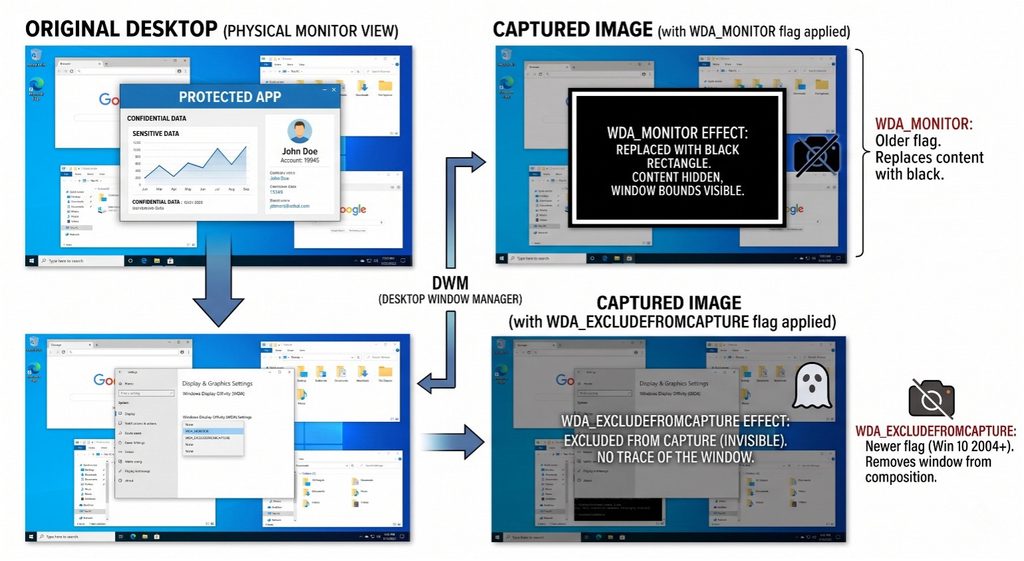
| WDA_MONITOR | 0x00000001 | Window shows only on a physical monitor; captures render it black. |
| WDA_EXCLUDEFROMCAPTURE | 0x00000011 | Window shows only on a physical monitor; captures omit it entirely (no suspicious black box). |
WDA_EXCLUDEFROMCAPTURE is the newer, “better” flag. It arrived in Windows 10 Version 2004 (build 19041). Before that, WDA_MONITOR was the only option, and it left a tell-tale black rectangle. The upgrade is cosmetic from a defense standpoint: black box versus empty space. The security boundary is identical.
The difference is in what the capture comes back with. Under WDA_MONITOR, a screenshot or a screen share contains a black rectangle sitting exactly where the window is, and whatever the window overlaps is hidden along with it. Anyone looking at that capture learns that something was being withheld, how big it was, where it sat, and, in the case of a recording, how long it stayed open and when it closed. Under WDA_EXCLUDEFROMCAPTURE, the window is not in the frame and the desktop behind it shows through, so the capture looks like the application was not running at all. The user sharing their screen has no black box to explain, and the people watching get no cue that anything was hidden.
The Desktop Window Manager (DWM) enforces the exclusion. It is the compositor that assembles every window into the final image on screen. When a capture tool asks DWM for a frame of the desktop, DWM builds that frame and leaves the flagged window out of it. The pixels still reach the physical display; they never reach the composited frame handed to the capture tool. The flag embeds nothing in the window’s content and blocks no capture tool from running. Every bypass later in this post is a version of the same idea: get the image from somewhere other than DWM’s composited output, and the exclusion never applies.
Why Developers Reach for It Anyway
It’s an attractive control because:
- It’s one line of code. No kernel driver, no service, no secure enclave.
- It’s OS-native. No third-party dependency to vet.
- It defeats the lazy attacker. PrtSc, Snipping Tool, Zoom/Teams/Meet screen share, OBS via the standard desktop-duplication path: all come up empty. Against a casual insider or an over-eager AI screenshotter, that’s a win.
The Signal case is the honest version of the story. When Microsoft shipped Recall, a background feature that silently snapshots the screen every few seconds into a searchable database, Signal had no developer-facing opt-out to keep chats out of the index. So, Signal set the display-affinity flag on its window. Signal’s own engineers described it, more or less, as a “one weird trick”: abusing a media-protection flag because Microsoft gave privacy apps no proper API. That’s a defensible decision against that specific threat, an OS feature capturing through the normal compositor path. It is not a general-purpose confidentiality control, and Signal never claimed it was.
The failure mode is the marketing leap: a product that “defeats normal screenshots” gets sold as one that “protects sensitive data,” with no threat model in between.
Who This Does Not Stop
Every control ever shipped can be bypassed, so the useful question is who can bypass this one, holding what access. Three capability tiers cover it.
Tier 0: The User Who Avoids the Blocked Path
Even with zero special access, plenty of capture paths never touch the DWM-composited surface the flag protects.
- The analog hole: a phone camera pointed at the monitor. The pixels that reach a retina reach a camera sensor the same way. No API closes this, and Microsoft’s docs concede as much.
- Context that breaks DWM: the protection only works while DWM is composing the desktop, a limit Microsoft states in its documentation. Remote Desktop sessions disable DWM, so a window invisible to a local screenshot can render perfectly over RDP. Certain remote-assistance and mirroring stacks, and some virtual-display configurations, land in the same bucket. The control silently fails open, which is the worst way for a control to fail.
- VM quirks: in basic VMs without GPU acceleration, the compositor path can differ enough that the exclusion doesn’t behave as advertised.
None of these require privilege escalation. They require not using the one capture method the flag was designed to block. Tier 0 is where most real-world leakage happens, and it leaves almost nothing behind on the host.
Tier 1: The Local User Willing to Run Code
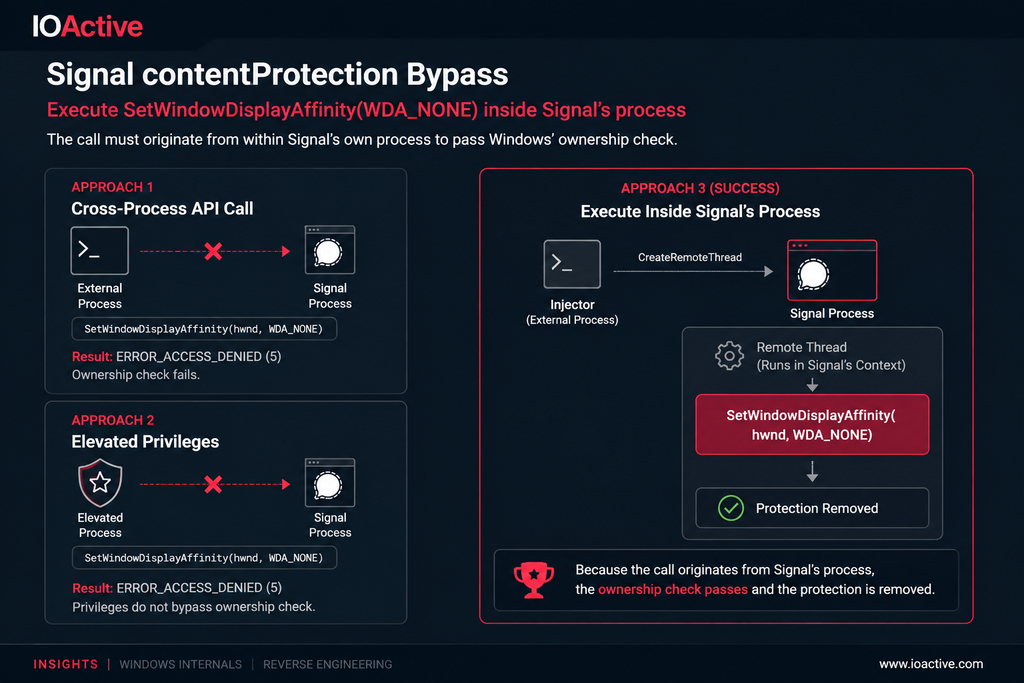
The window belongs to a process, and processes on a user’s own machine are not a trust boundary against that user. IOActive consultant Taha Draidia recently published the concrete version of this in Signal Windows Desktop: contentProtection Bypass, which takes apart Signal Desktop’s screen-capture protection. Signal reaches this same Win32 call through Electron’s setContentProtection() wrapper, so the write-up doubles as a case study in what the flag is worth.
Flip the flag back from inside the process. Draidia tested the obvious approach first: call SetWindowDisplayAffinity(hwnd, WDA_NONE) on Signal’s window from another process. That fails with ERROR_ACCESS_DENIED, and running elevated fails the same way, because the kernel check compares the caller’s process identity against the window’s owner rather than its privilege level. Administrator rights do nothing here. CreateRemoteThread into Signal’s own process satisfies the check, and the protection turns off with no error, no prompt, and nothing on screen to mark the change.
Capture below the compositor. DWM removes the window while assembling the desktop image, so the removal exists only in the copy DWM hands out. Capture that reads frames lower in the stack and closer to the hardware never receives that copy, and may see the window intact. The flag protects one rendering path rather than the content.
This explains where the protection breaks down, not how to build something that breaks it. Anyone who can run code in the user’s session can neutralize the flag, and the barrier is measured in API calls rather than in exploit development. The control is therefore exactly as strong as whatever stops code execution in that session.
Tier 2: Kernel, Driver, or Physical Access
The flag does not apply here at all. DWM checks the exclusion while it builds the desktop image, so code running at or below the display driver gets the pixels without that check ever happening. Independent kernel-mode research makes the point from the other direction: the proof-of-concept driver DWMShield skips the public API entirely and calls the undocumented internal routine GreProtectSpriteContent directly, passing a target window handle over an IOCTL from a non-elevated client. It reaches the same DWM enforcement point Draidia’s work identified, but from underneath the ownership check rather than by satisfying it — the mirror image of the CreateRemoteThread approach in Tier 1, and a separate piece of research rather than an extension of it.
The Actual DRM, for Comparison
The irony in the title is that real DRM exists on the same platform and works on a different principle.
Hardware-backed protected media paths (Widevine L1, PlayReady SL3000, FairPlay) decrypt and composite content inside a Trusted Execution Environment, a secure media path that user-mode and often kernel-mode capture cannot reach. That’s why screen-recording a premium streaming-video service yields a black frame even with admin rights: the pixels never exist in a framebuffer the OS will hand out.
The flag that isn’t DRM, side by side with the DRM that is:
| SetWindowDisplayAffinity | Hardware DRM (protected media path) | |
| Enforced by | DWM composition, kernel-side owner check on the flag | Secure hardware / TEE |
| Where the viewable image lives | Normal framebuffer; omitted only from the copy handed to capture | Inside the TEE; never in a framebuffer the OS can hand out |
| What it covers | One top-level window at a time, per HWND, re-applied for every new window | The content stream itself, wherever it plays |
| Stops normal screenshots | Yes | Yes |
| Kept out of Recall snapshots | Yes | Yes (Microsoft: Recall won’t store DRM content) |
| Stops a local user with admin | No (admin enables injection) | Yes |
| Survives process injection | No | Yes |
| Survives RDP / DWM-off contexts | No (fails open) | Yes |
| Stops a phone camera | No | No |
| Who can disable it | Any code running inside the owning process | No software path; requires defeating the hardware |
| How it fails | Open and silent: no error, no log, no visual change | Closed: the license refuses to bind, playback stops or drops quality |
| Cost to adopt | One API call per window, no licensing | Device certification, license server, key management; SL3000 is device-only |
| Microsoft’s own classification | “Not a security feature or DRM” | Actual content protection |
SetWindowDisplayAffinity is a hardening measure against opportunistic capture. Hardware DRM is a confidentiality control. Treating the flag as a confidentiality control is where the false sense of security begins.
What Developers Should Do
Using SetWindowDisplayAffinity is reasonable. Products go wrong when they treat that one API call as the finished control.
Set it on every top-level window, not just the main one. Affinity is a per-HWND property and every new window starts at WDA_NONE. Dialogs, tooltips, context menus, toasts, and the separate windows that WPF popups and Electron render into each get their own HWND. Flag the main window but not the dialog, and the screenshot catches the secret in full while the ordinary window behind it is the part that gets hidden.
Check the return value. The call returns FALSE on a window that isn’t top level or doesn’t belong to the calling process, and a silent failure still looks protected in code review. Treat it as a security event. On builds older than 19041, WDA_EXCLUDEFROMCAPTURE succeeds and behaves as WDA_MONITOR, so the window turns black instead of vanishing and the API never mentions the difference.
Re-read the flag. GetWindowDisplayAffinity reads the current value from any process, so the app or a monitoring agent can poll it. A change to WDA_NONE the app didn’t make means something else is writing to its process: log it, alert on it, and consider blanking the view until the app can verify its own state.
Use the supported control when one exists. Recall now has real policy: Allow Recall to be enabled (AllowRecallEnablement) and Turn off saving snapshots for Recall (DisableAIDataAnalysis), and managed devices have it removed by default. The flag was a workaround for consumer machines with no opt-out, which is still where it earns its keep.
Document the threat model. Name what the feature stops: screenshot tools, screen sharing, OS-level snapshotting. Name what it doesn’t: cameras, remote sessions, code running in the user’s session, anything at kernel level. Microsoft’s Azure Virtual Desktop documentation is the model to copy: it states plainly that the feature isn’t DRM-level protection and isn’t a substitute for one, and recommends pairing it with other controls.
Pair it with content-level controls. Reveal-on-tap for secrets, short display timeouts, redaction by default, per-session watermarking.
What Defenders Should Monitor
You cannot stop capture on a machine the user controls. You can often catch the attempt.
Injection into the protected app: the Tier 1 bypass is a common and ordinary injection, and the Signal bypass used CreateRemoteThread, the loudest option available. Watch Sysmon Event ID 10 (ProcessAccess) against that target with PROCESS_VM_WRITE, PROCESS_VM_OPERATION, or PROCESS_CREATE_THREAD; Event ID 8 (CreateRemoteThread); Event ID 25 (ProcessTampering); and Event ID 7 (ImageLoad) for unsigned modules or anything from a user-writable path.
Tamper events the app reports about itself: this depends on developers implementing the affinity re-read above, so ask whether they did. An app reporting “my window affinity changed and I didn’t change it” is a detection with almost no false-positive surface.
Capture and remote-control tooling on regulated hosts: OBS, ShareX, Snagit, ffmpeg with a screen-grab input, and support stacks such as AnyDesk, TeamViewer, and ScreenConnect. Inventory and policy rather than alerting, since none are malicious by default. The question is why a capture stack is installed on a host whose security depends on capture being hard.
Policy drift: if Recall is disabled by policy, verify it stayed disabled on the endpoint rather than trusting that the GPO exists. BYOD is the harder case, because Recall is available by default there and the user decides.
Everything a camera sees: out of reach of host telemetry. That leaves physical controls and per-session watermarking that survives a photograph. “We can’t stop the screenshot, but we can tell whose session it came from” is a more defensible promise than “the screenshot came out black.”
Conclusion
Read the flag as what it is and Microsoft’s two pages stop contradicting each other: it keeps sensitive windows out of casual captures and out of Recall on machines where the user is not the adversary, and it does nothing about the three tiers above. When a datasheet or a control matrix claims more than that, the difference is data with nothing protecting it, and another control has to cover the gap. A design that depends on a screenshot-proof window for confidentiality is a finding rather than a control.
References
- Microsoft Learn — SetWindowDisplayAffinity function (winuser.h)
- Microsoft Learn — Manage Recall for Windows clients
- Microsoft Learn — Screen capture protection in Azure Virtual Desktop
- IOActive — Signal Windows Desktop: contentProtection Bypass
- GitHub — ahossu/DWMShield